Your account
What you can do once signed in to the portal: favourite and save data, get notifications, order services and manage your profile.
Last updated on
You can browse and download data without signing in. Signed in, you can also favourite datasets, save tables and get notifications when they are updated, order services and keep track of their payments. To sign in, see Signing in.
To open your account, click your name in the top right corner. The same menu has Log out. On the account pages, the sections are listed on the left.
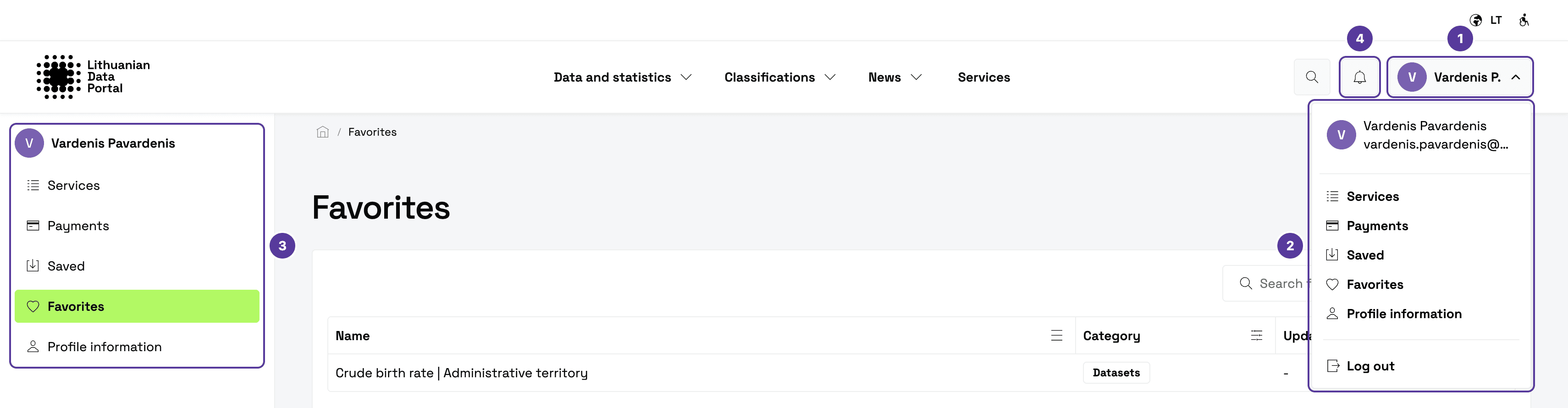
- Your name — click it to open the account menu.
- The account menu — the sections and Log out.
- The list of sections — on the left of every account page.
- The bell — opens Notifications.
Sections
Signing in
Signing in through the e-Government Gateway, your first sign-in and signing out.
Favourites and saved tables
Favourite datasets and saved tables with folders, automatic updates and emails.
Notifications
Portal notifications and email settings.
Service orders and payments
Applications, the order form and payments for services.
Profile and sign-in history
Your email, phone and the log of your sign-ins.
How is this guide?